
Quick answer: A deload week without an app or wearable is entirely possible by watching five signs in your own training log: stalled or declining performance across multiple sessions, joint aches that linger, muscle soreness that lasts longer than usual, dropping motivation to train, and poor sleep despite normal habits. When two or more show up together for a week or more, it’s time to reduce volume and intensity by roughly 40–60% for about a week, while keeping your training frequency the same.
Recovery apps and wearables love to tell you exactly when to deload with a color-coded score, but most lifters were successfully managing fatigue and taking a deload week without an app long before any of that technology existed. The signals were always there in the training itself — you just have to know what to actually look for.
Table of Contents
What a Deload Week Without an App Actually Is (and Isn’t)
A deload week is a planned, short period of reduced training volume, intensity, or both, designed to dissipate accumulated fatigue while keeping training frequency roughly the same. A cross-sectional survey of strength and physique athletes, published on PubMed, found that athletes typically deload for about 6.4 days, roughly every 5.6 weeks, most often by reducing reps per set and total sets per week while keeping how often they trained largely unchanged.
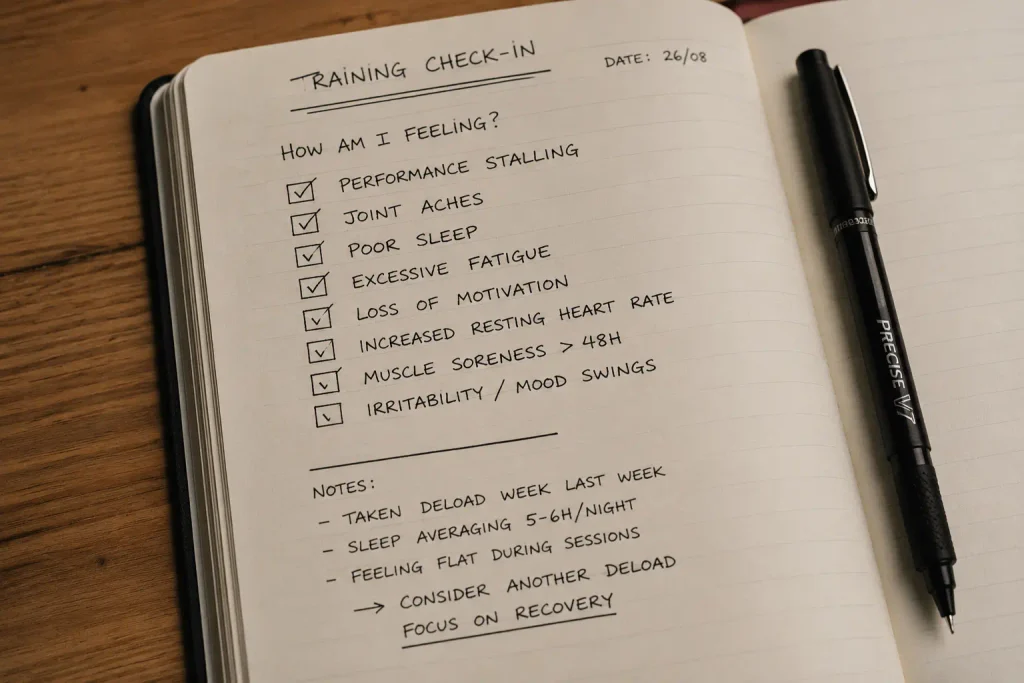
That same research found the most common triggers weren’t a wearable’s readiness score — they were performance stalling, increased muscle soreness, and joint aches, exactly the kind of signals visible in a plain training log without any technology at all.
The Real Signs You Need a Deload Week Without an App
1. Performance Stalling or Declining Across Multiple Sessions
A single bad session means nothing. Two or three sessions in a row where your usual working weight feels noticeably heavier, or your rep count drops at the same load, is the clearest sign your body isn’t recovering between sessions the way it was a few weeks ago.
2. Joint Aches That Linger Beyond a Session or Two
Normal training soreness sits in the muscle and fades within a couple of days. Joint discomfort — in the knees, elbows, or shoulders — that lingers or slowly builds over several weeks is a different signal entirely, and one of the clearest reasons athletes report choosing to deload.
3. Muscle Soreness Lasting Noticeably Longer Than Usual
If the same training volume that used to leave you sore for a day now leaves you sore for three or four, your recovery capacity has genuinely changed, even without a single metric on a screen telling you so.
4. Dropping Motivation to Train
A training session you’d normally look forward to starting to feel like a chore, with no obvious life-stress explanation, is a real and commonly reported signal — not just “being lazy.”
5. Poor Sleep Despite Normal Habits
If your sleep schedule, caffeine intake, and bedtime routine haven’t changed but your sleep quality has gotten noticeably worse, accumulated training fatigue is a common, often-overlooked cause worth ruling out before blaming anything else.
How to Actually Take a Deload Week Without an App
Once two or more signs show up together, taking the deload itself is straightforward.
Reduce training volume by roughly 40–60%. Cut sets per exercise and total sets per session, following the same pattern most surveyed athletes report using.
Keep your training frequency the same. Still show up the same number of days per week — you’re reducing how much you do each session, not how often you train.
Lower intensity slightly if needed, particularly on your heaviest compound lifts, while keeping movement patterns familiar rather than switching exercises entirely.
Plan for about one week. The most commonly reported deload duration is close to six days — long enough to dissipate fatigue, short enough to avoid losing meaningful fitness.
Return to normal training and watch the first session back closely. A noticeably easier, stronger-feeling session at your usual working weight is the clearest sign the deload did its job.

How to Track Whether Your Deload Week Actually Worked
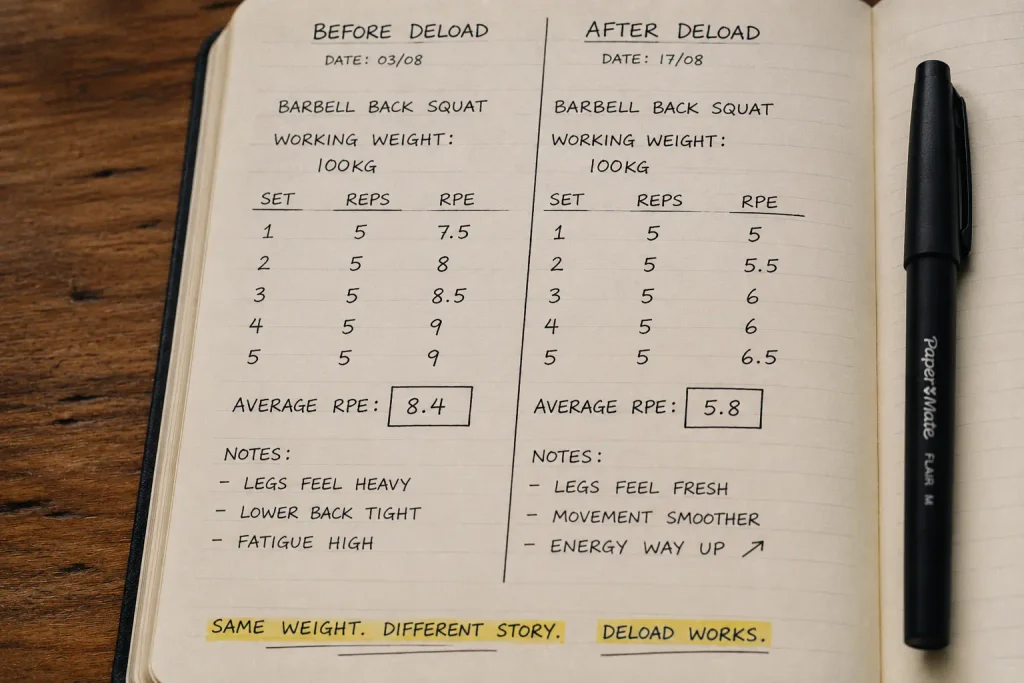
Log your working weight, reps, and RPE for your key lifts in the session immediately after your deload, and compare it directly to your last normal session before the deload started. A lighter-feeling RPE at the same weight, or the ability to add a rep or a small amount of weight, is a strong sign the deload achieved what it was supposed to.
This is the same gym performance tracking approach used everywhere else on this blog — the deload itself isn’t the interesting data point, the comparison before and after is.
My Own Test: Deciding on a Deload Without Any App Telling Me To
Three weeks into a harder training block, I noticed my bench press RPE creeping from a 7 to a solid 8.5 at the exact same weight, two sessions in a row. My right shoulder had also started feeling slightly cranky by the end of pressing days — nothing sharp, just a dull ache that hadn’t been there a month earlier. Two signs, both visible without a single device.
I cut volume by about half for six days: same number of gym days, fewer sets per exercise, slightly lighter loads on my main lifts. Sleep quality, which I hadn’t even flagged as a problem beforehand, noticeably improved during that week too — a connection I hadn’t expected until it happened.
Back to normal training after the deload, that same bench press session that had felt like an 8.5 the week before came in closer to a 6.5 at the identical weight. The shoulder ache was gone. That single before-and-after comparison, sitting side by side in my log, was far more convincing than any generic “you should deload every 6 weeks” rule could have been.
Common Mistakes With Deload Weeks
These mistakes are what make deload week without an app feel unreliable, when the actual signals were there in the log the whole time.
- Deloading out of fear rather than evidence. Taking a deload every few weeks regardless of actual signs can genuinely slow progress by cutting stimulus you didn’t need to cut.
- Confusing normal soreness with the need for a full deload. A single hard session’s soreness fading within the usual timeframe isn’t a signal on its own — it’s the accumulation and duration that matter.
- Reducing training frequency instead of volume. Most successful deloads keep the same number of sessions per week while trimming sets and intensity within each one, not skipping sessions entirely.
- Skipping the before-and-after comparison. Without logging performance right before and right after, you can’t actually confirm whether the deload worked or if you just got lucky with a good day.
- Ignoring non-training causes of the same signs. Poor sleep, high life stress, or simple undereating can produce identical symptoms to training fatigue, and a deload alone won’t fix those underlying issues.
How Often Should You Plan Deload Weeks Without an App?
Building a deload into your program roughly every 4–8 weeks works well as a proactive baseline, matching what surveyed athletes report doing in practice, though the exact timing should still bend around the actual signs above rather than a rigid calendar date. If you’re closely tracking progressive overload and overtraining signs already, you’ll usually see the need for a deload coming several sessions before it becomes unavoidable.
Proactive vs. Reactive Deloading: Which Approach Is Better?
There are two honest philosophies here, and the research doesn’t crown a clear winner. Proactive deloading means scheduling a deload week every 4–8 weeks regardless of how you feel, treating it as insurance against fatigue you can’t yet see building. Reactive deloading means waiting until two or more of the five signs above actually show up before cutting volume.
In practice, a hybrid works well for most lifters: keep a rough proactive schedule in mind, but let the actual signs move that date earlier or later rather than following it rigidly. A harder training block full of new personal records might genuinely need a deload week without an app telling you so at week 5 instead of week 8, while a lighter maintenance phase might comfortably stretch past 8 weeks without any of the five signs appearing at all.
Frequently Asked Questions About Deload Week Without an App
How long should a deload week last?
Research on strength and physique athletes shows the typical deload lasts around six days, close to a full week, which is long enough to reduce fatigue without causing a meaningful loss of strength or conditioning.
Do I need to stop training completely during a deload?
No. Most effective deloads keep the same training frequency while reducing volume and sometimes intensity, rather than taking a complete break from the gym.
What if I don’t see any of the five signs — do I still need to deload?
Not necessarily. Some athletes in research on this topic reported feeling ready to return to normal training almost immediately after a scheduled deload, suggesting the need varies significantly by individual and training block rather than following a fixed schedule for everyone.
Can poor sleep alone mean I need a deload?
It can be one signal, especially when combined with performance stalling or soreness, but poor sleep with no other signs present is worth investigating on its own first, since factors like stress or caffeine timing are just as likely causes.
How do I know if my deload actually worked?
Compare your key lift’s weight, reps, and RPE in the first session after the deload to your last session before it. A noticeably easier session at the same load is the clearest confirmation.
Is it possible to deload too often?
Yes. Deloading without real signs present, purely out of caution, removes training stimulus you may not have needed to remove, which can slow progress rather than protect it.
Can I tell the difference between needing a deload and just having a bad week?
Look for the signs persisting across 2–3 sessions rather than a single one. A single rough session is normal variation; the same pattern repeating across multiple sessions is what separates genuine accumulated fatigue from an isolated bad day.
Final Thoughts on Deload Week Without an App
Recovery apps and wearables can make fatigue management feel more complicated than it needs to be. A deload week without an app or wearable is entirely achievable by watching the same five signs athletes have used for decades: stalling performance, joint aches, unusual soreness, dropping motivation, and disrupted sleep — all visible in a training log you already keep.
Start today: review your last three sessions for any of these five signs. If two or more show up together, that’s your cue to cut volume by about half for the next week and watch your first session back closely — that’s the entire process of running a deload week without an app.
1 thought on “Deload Week: How to Know You Need One Without Any App or Wearable”